
Device level view

  • 1

    Managing individual devices

    You can manage and edit individual devices from the device dashboard containing the information and settings of your tracker.

    Access this dashboard by locating a tracker from your list of devices under My devices or by searching for specific devices on My devices or Map.

    Managing device level view

    Tiles

    The screen gives you an overview of the device and relevant data from the latest report:

    Device info and serial no.
    Hover the tile to see more info or click the tile to copy the serial no. into the clipboard
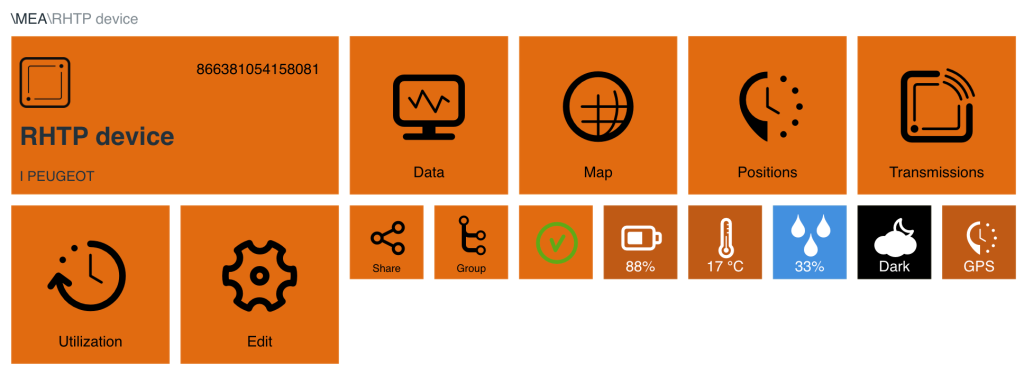
    • Data: click to see graphs with data
    • Map: hover to see recent position or click to go to map
    • Positions: click to see list of device positions – filter available
    • Transmissions: click to see list of logs and transmissions
    • Trips: click to see accumulated km
    • Utilization: click to see utilization data
    • QR scans: click to see list of QR scanned positions
    • Edit: click to edit the parameters of your device
    • Group: click to go one group level up
    • Share: create a public link to share/unshare data with others
    • Connection status: marked as green, yellow or red
    • Battery status
    • Temperature status
    • Light sensor: dark/light
    • GPS/Triang.: shows if last position was determined via GPS or triangulation
    • Humidity status

    Managing device level view


Still need help?

Can't find what you're looking for? Our support team is here to help.

Contact Support