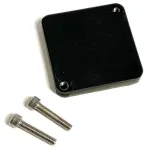
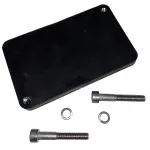
Mount and install hardware

  • 1

    5 tips for installing a Trusted tracking device

    We recommend that you read the full article to learn how to give your Trusted hardware the best conditions for a long energy-effective life.

    But to give you the most important recommendations and get you started, keep these 5 tips in mind:

    1. Install with label facing up or pointing outwards to an open view of the sky whenever possible.
    2. Choose a safe, discreet location to avoid detection, removal or vandalism.
    3. Install the device on a solid flat area directly on assets to best track movements and vibrations.
    4. Install where the device is unlikely to suffer direct impacts (tree branches, tools, or the ground etc.).
    5. Never install the device where it is completely surrounded or covered in metal or similar materials.

    Important to keep in mind

    Always install and fasten devices properly with quality installation kits – especially on moving assets in traffic.

    Trusted cannot guarantee that you will secure the data you expect based on these tips for installation. We always recommend testing different installations to find the one that works the best for your use case. 

  • 2

    Best practice guide lines for installation and mounting

    A Trusted device has many various use cases and can be installed in countless places on very different assets.

    But there are two general guidelines that serve as best practices for installation. You should aim to fulfill these two whenever possible.

    Give your Trusted hardware the best conditions for a long energy-effective life by keeping the following in mind:

    Secure a clear connection

    A Trusted device transmits data by connecting to mobile networks much like a mobile phone. If your cell
    phone has a poor connection at a specific location, the device will too.

    With this in mind, you should always aim to install devices with optimal conditions for data connection. This also applies to receiving the best and most accurate GPS position.
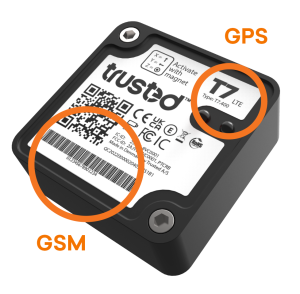
    • Never install the device where it is encapsulated in metal or similar material such as wire netting or foil. This will severely limit the ability to capture GPS satellite signals and degrade the GSM reception and transmission (creating a Faraday shield).
    • Obtain the best radio path with horizontal placement. Face the label upwards with GSM and GPS antennas uncovered. If the device is
      placed in a corner, place the GSM antenna away from the corner.
    • When mounting on a vertical or inclined surface: Aim for the best possible unobstructed sky view for the GPS antenna.


    Choose safe and discreet location

    Even though Trusted devices are very robust, it is still recommended to avoid any clear and obvious hazards. This will protect both the device and the parts used for installation, such as screws or magnets.

    Keep in mind the maximum levels of operation stated in the product sheets to maintain product warranty.

    • Ensure that the following conditions are respected to maintain product warranty. Max impact/shock/vibration value: 8 g. Operating temperature range: -30 °C to +85 °C.
    • Install where the device is unlikely to suffer direct impacts (tree branches, tools, or the ground etc.). When possible, also avoid unnecessary exposure to water, chemicals, mud, sand, or stone crackles.
    • Avoid detection, removal, or vandalism by selecting a discreet location. If relevant, installations above a height of 2,5 meters are preferred as they are harder to spot and get to than a location at the ground.
  • 3

    Tips for installation based on your use case

    The tips below are great to have in mind when mounting as they can help securing the data you need.

    Unfortunately, we cannot guarantee that you will secure the data you expect based on these tips. Test different installations to find the one that works the best for your use case.

    Position data

    Theft protection

    • Place in a discreet location. Choose somewhere out of sight and away from where traditional wired tracking hardware is typically installed as thieves will know where to look for this.

    Fleet overview

    • Place device for best GPS reception. Follow the guidelines for Best practices whenever possible. When installing devices on similar assets, consider choosing a similar mounting location.

    Utilization data

    Running hours

    • Place directly on assets in a flat area to best track motion and vibrations. Install away from places of direct impacts of stone or debries. Consider installing with additional protective shield.

    Service intervals based on distance

    • Place device for best GPS reception. Follow the guidelines for Best practices whenever possible. When installing devices on similar assets, consider choosing a similar mounting location.

    Accelerometer data

    Impact recorder

    • Place directly on assets in a flat area to best track drops, hits, and impacts. Install away from the most likely places of impact. Consider installing with additional protective shield.

    Handling, tilt or rotation

    • Place directly on assets in a flat area to best track changes in inclination or rotation. If placed on pallet, install away from the most likely places of impact or consider additional protective shield.

    RHTP data

    Humidity and temperature

    • Place device so the RHT sensor has clear access to the surrounding air/environment while being close to the assets you want to keep safe


    Important to keep in mind

    Remember the device should not be entirely surrounded by metal in any use case. 

    Test location by checking the quality of your signal in your data on Trusted Data Portal before installing permanently. Learn how.


  • 4

    Other things to consider when installing Trusted hardware

    You are off to the best of starts with your Trusted hardware by following the tips above. These last few tips are meant as a help to make the process even easier.

    • Use the Trusted Data App when installing your device: Scan QR code to set up basic configurations, or take notes and upload pictures of your installation directly from your phone.
    • When installing devices on similar assets, consider choosing a similar mounting location for an easy installation process with a minimum of time.
    • Make a note or take a picture of your installation for later reference or replacement. Save the information on the Trusted Data Portal– easy with the app.
    • If you want the flexibility of moving a device between different assets, consider installing device using a magnet kit (sold seperately).
  • 5

    Recommended installation kits

    Trusted hardware is designed to be installed with either quality screws or magnets.
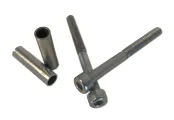
    Quality screws

    Magnets

    Screws are best for permanent installations. But if you want the flexibility of moving the device between different assets, a magnet kit is the recommended option.

    When attaching devices with screws, be careful not tighten too hard as this could exceed the recommended torque moment of 3 Nm and compromise the durability of the device.

    Both installation kits are available from Trusted (sold separately).

Still need help?

Can't find what you're looking for? Our support team is here to help.

Contact Support