Hardware
Mount and install hardware
Read article
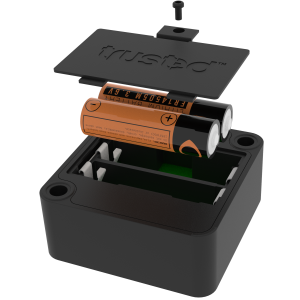
To replace the batteries of your T1 device, first unfasten the screw on the back cover of the device with a cross-point screwdriver.
Keep it safe, dry and at hand.
Place a finger, or a flat head screw driver, to press down the lock mechanism in the back cover that protects the batteries.
Remove the cover and take out the old battery cells and dispose of them in accordance with your local battery recycling regulations.
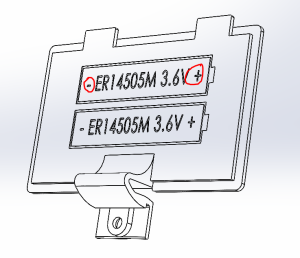
Now insert the new batteries matching the -/+ poles to their individual positions.
Click back the back cover and reinsert and fasten the screw.
New batteries must be authorized ER14505M cells only.
If you prefer, you can purchase directly from Trusted, but compatible cells of the ER14505M type should be fine. Read more below.
If you wish or are required by necessity, it is possible to only insert one battery. Your device will still function as intended only with shorter battery life.
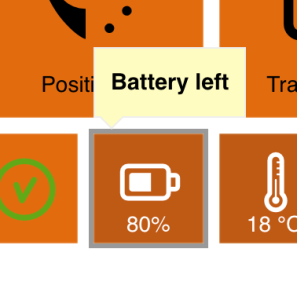
Under each device on the Trusted Data Portal and Trusted Data App, you will find data with an estimation of remaining battery life in percentage.
For this to register your change of battery, you will need to reset it manually after you have replaced the batteries.
If you choose to skip this point, your device will alert you that the device battery set is running out, even if you are good to go with your new batteries.
For the best user experience, we recommend that you do this every time you replace the batteries
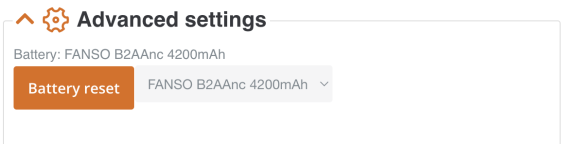
Navigate to the device in question on the TDP and click Edit. Scroll to Advanced settings. Here you will find the Battery reset button.
Above the button, you will see the former selection of battery type and size. From the dropdown next to the button, choose the appropriate selection (1 or 2 batteries) and click the button to confirm the reset.
Your battery tile will now reflect the change, however notice the restrictions mentioned below.
The battery estimation tile strictly reflects a rough estimate and we recommend users only to use it as an indication of relative battery use and remaining battery life.
Out of an abundance of caution, consider only sending out devices for longer durations with fresh batteries.
As mentioned, you should only use authorized ER14505M cells for Trusted T1 devices.
The list below serves as a guide to producers and individual cells that follow the specifications of the T1 device.
By installing batteries that have other specification than those recommended for use by Trusted into your T1 device, you risk that it can become unresponsive and stop working as intended.
This would both compromise your tracking operations and void the guarantee on your product in case of permanent malfunction.
Other articles in this category that might help
Can't find what you're looking for? Our support team is here to help.
Contact Support